Project Overview
This homelab build centers around creating a production-grade environment in a compact dual 10-inch rack form factor. The setup supports isolated networks, development workloads, AI experimentation, and media services while maintaining professional rack mounting standards.
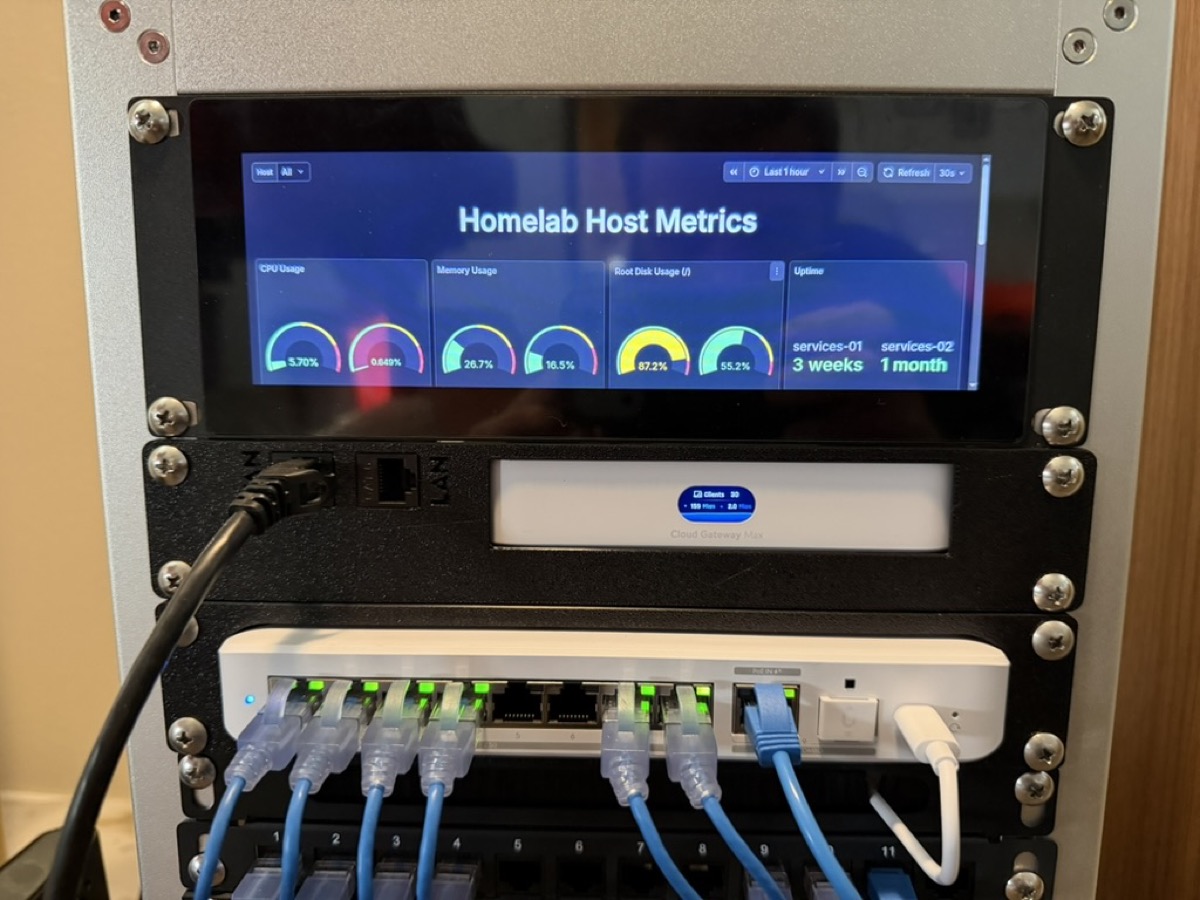
The project emphasizes clean cable management, unified UniFi networking, and real-time monitoring through a custom Grafana dashboard displayed on a rack-mounted LCD screen.
Hardware Selection
Enclosure
The setup uses two GeeekPi 10-inch racks providing compact, desktop-friendly mounting for all equipment. Despite their small footprint, they maintain standard rack mounting specifications, allowing professional equipment alongside custom 3D printed adapters for non-rack-mountable devices.
Networking
The network infrastructure is built entirely on UniFi equipment for unified management:
- UniFi Cloud Gateway Max: Primary router and security gateway with built-in LCD status display
- USW Flex 2.5G (8-port): 2.5GbE switch for high-speed connections between compute nodes
- UniFi U7 Pro: WiFi 7 access point mounted at the top of the rack
The UniFi ecosystem provides centralized management through the UniFi Network application, with VLAN support, traffic analytics, and threat management built in.
Compute
Two Minisforum mini PCs serve as the primary compute nodes:
- services-01: Internal services (home automation, media management, monitoring)
- services-02: External-facing services (web applications, APIs)
A Mac Mini M4 Pro handles AI workloads, providing Apple Silicon performance for machine learning tasks and local LLM inference.
Display and Monitoring
A Raspberry Pi 5 powers a rack-mounted LCD display running as a kiosk, showing the Homelab Host Metrics dashboard built with Grafana. The dashboard displays real-time CPU, memory, and disk usage across all services, along with uptime tracking.
Smart Home Integration
A Philips Hue Hub is mounted in the back of the rack, centralizing smart lighting control for the home network.
Custom 3D Printed Components
Not all equipment fits standard 10-inch rack dimensions. Custom rackmount adapters were designed and printed in PETG for durability. These adapters allow the mini PCs, Raspberry Pi, and networking equipment to be securely mounted in the rack.
Custom 3D printed components include:
- Mini PC mounting brackets
- LCD display mount for the kiosk screen
- Cable management clips
- Fan mounting brackets
- Power distribution brackets
STL files for custom components are available in the GitHub repository.
Cooling and Power
Cooling is handled by two Noctua NF-A4x10 fans mounted at the top of the enclosure. These 5V fans are powered by a USB adapter and provide quiet, efficient airflow to prevent heat buildup.
Power distribution uses a managed PDU with per-outlet monitoring, allowing tracking of power consumption for each component.
Network Configuration
The network topology uses the UniFi Cloud Gateway Max for routing, firewall, and security features. The UniFi Network application provides a unified interface for managing all network equipment, VLANs, and traffic policies.
Key network features:
- Unified management through UniFi Network
- VLAN segmentation for IoT, guest, and server networks
- Traffic analytics and bandwidth monitoring
- Threat management and intrusion detection
- Remote access via UniFi's cloud portal
Lessons Learned
Building a compact homelab presented several challenges:
Heat Management: Initial testing showed higher temperatures than expected. Adding the Noctua fans and ensuring proper airflow paths reduced temperatures by 15-20°C.
Cable Routing: With limited space, careful planning of cable paths was essential. Color-coded patch cables and velcro straps helped maintain organization.
Power Sequencing: Some equipment is sensitive to power-on order. Documenting the startup sequence and using managed PDU outlets for staged power-up resolved boot issues.
Future Enhancements
Planned improvements include:
- Adding NAS storage to the rack
- Expanding monitoring dashboards with service-specific metrics
- Implementing automated backups to cloud storage
- Adding UPS for power protection
Resources
Configuration files, network diagrams, and 3D models are available in the project repository. The documentation includes detailed setup instructions for replicating this build.